
Change Order Template
When the scope of a building or renovation job changes, a written change order protects everyone. Fill in this form with the project details, describe each change with its cost or credit and any extra days, and it calculates the net change, the revised contract sum and the new completion date, ready to print for the owner, contractor and architect to sign.
- Free to use
- No sign-up
- Runs in your browser
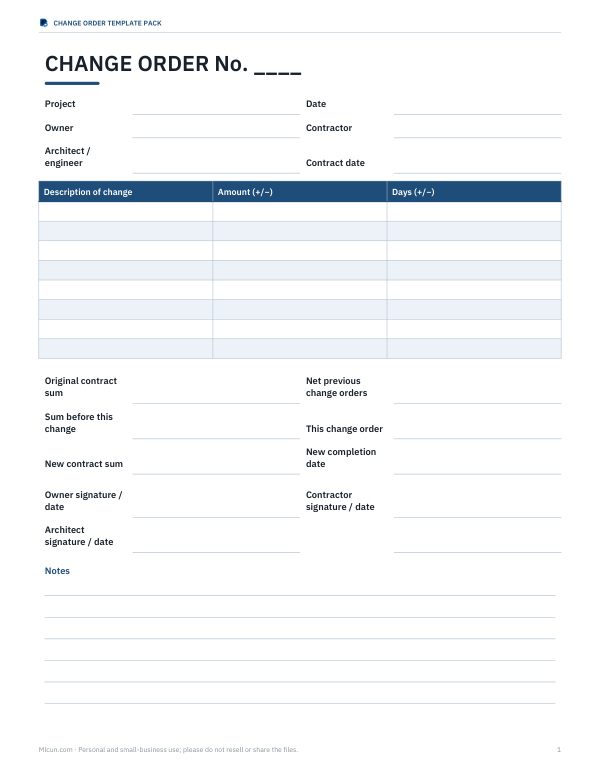
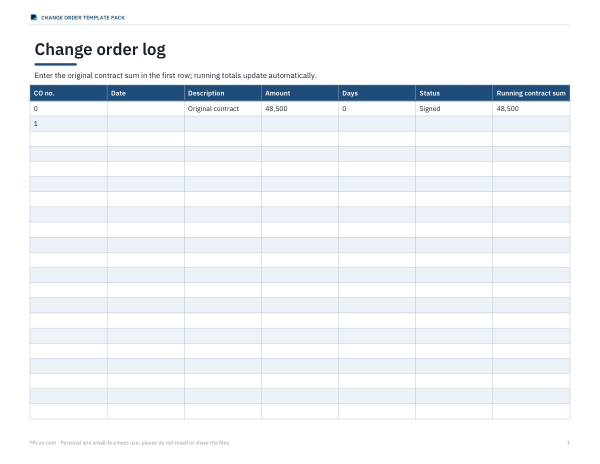
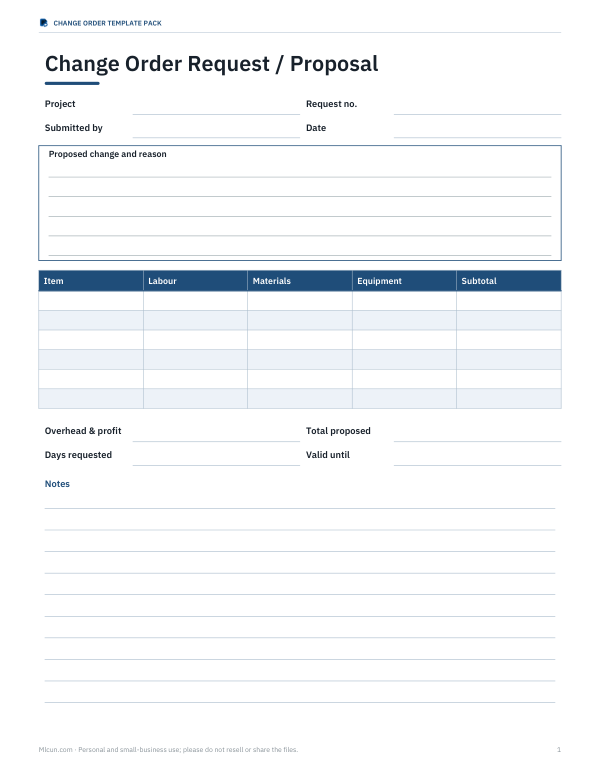
Change order form
| Description of change | Cost (+) or credit (−) $ | Days (+/−) |
|---|
Change Order Template Pack
Editable Word change order, an Excel change order log with running contract totals, a change order request form and a time-and-materials worksheet.
- Change order (DOCX/PDF)
- Change order log (XLSX)
- CO request (DOCX/PDF)
- T&M worksheet (XLSX)
Formats: DOCX, PDF, XLSX. Instant download after payment (link valid 72 hours, up to 5 downloads). AI-assisted: the templates were drafted with AI help and reviewed and laid out before publishing.
$5.00 USD, one-time 4 files · about $1.25 each
- Instant download
- 7-day refund
- Secure checkout by Stripe
7-day money-back guarantee. Full refund within 7 days of purchase, even after you download.
Free sample: Change Order Form (PDF, 57 KB)
Full refund within 7 days — see the refund policy and license.
Free printables
Single sheets you can print right now, no sign-up. The full pack adds every sheet in one download plus the editable files.
 Printable T&M Worksheet
What a change order is
A change order is a written amendment to a construction contract that changes the work, the price, the schedule or all three. It records what is being added, removed or substituted, how much it costs (or saves), how many days it adds or removes, and the new contract totals — and it is signed by the owner and contractor (and often the architect) before the changed work goes ahead. Keeping every change in writing prevents disputes when the final bill arrives.
What to include
| Section | Details |
|---|---|
| Identification | Project name and address, change order number, date, parties |
| Reason | Owner request, unforeseen condition, design change, code requirement |
| Description | Specific work added, deleted or changed, with quantities and materials |
| Cost | Amount for each item, plus or minus; how it was priced (lump sum, unit price, time and materials) |
| Time | Days added or removed and the new completion date |
| Contract totals | Original sum, previous changes, this change, new sum |
| Signatures | Owner, contractor, and architect or engineer if involved |
How the totals are calculated
- Start with the original contract sum.
- Add the net total of all earlier change orders (increases minus credits).
- That gives the contract sum before this change order.
- Add this change order’s net amount — the sum of all its lines, with credits as negatives.
- The result is the new contract sum.
- Add the net days to the current completion date to get the new completion date.
Worked example
| Line | Amount | Days |
|---|---|---|
| Add under-cabinet LED lighting | +$1,340 | +2 |
| Delete tile backsplash (owner supplies) | −$620 | 0 |
| Replace rotted subfloor under sink | +$785 | +1 |
| This change order | +$1,505 | +3 |
With an original contract of $48,500 and $1,250 of earlier changes, the contract sum before this order is $49,750. Adding $1,505 gives a new contract sum of $51,255, and three extra days move a 20 November completion date to 23 November. These are the default figures in the form above.
Pricing a change
- Lump sum — a fixed price agreed before the work; simplest for the owner.
- Unit price — a rate per unit (per square foot, per fixture) times the quantity.
- Time and materials — labour hours at agreed rates plus materials and a markup; used when the scope is uncertain.
- Show overhead and profit markup the way your contract specifies.
- Include any permit or inspection fees the change triggers.
Good practice
- Never start changed work on a verbal agreement — sign first, or at least confirm by email the same day.
- Number change orders in sequence and keep a log.
- Attach drawings, quotes or photos that explain the change.
- State whether the time extension is included in the price or claimed separately.
- For unforeseen conditions, photograph what you found before covering it up.
- Check whether your contract requires change orders to be submitted within a set number of days.
Change order vs other documents
| Document | Purpose |
|---|---|
| Change order | Agreed change to work, price and/or time, signed by both parties |
| Change order request (proposal) | A contractor’s proposed price and time for a possible change |
| Construction change directive | An owner’s instruction to proceed before price is agreed (under some standard contracts) |
| Field order / minor change | Small change with no effect on price or time |
Common reasons for change orders
| Reason | Typical example | Who usually pays |
|---|---|---|
| Owner request | Upgraded fixtures, an extra window, a different finish | Owner |
| Unforeseen condition | Rot, hidden pipes, poor soil, asbestos discovered | Depends on the contract’s concealed-conditions clause |
| Design error or omission | Drawings don’t work as drawn | Often the owner, who may recover from the designer |
| Code or inspector requirement | Extra fire-stopping, egress window | Depends on whether it should have been in the original scope |
| Substitution | Specified product unavailable | Agreed case by case |
Keeping a change order log
A log lists every change order with its number, date, description, amount, days and status (proposed, approved, rejected, invoiced). Keeping a running total shows at a glance how far the contract has moved from the original price and schedule — useful for owners tracking a budget and for contractors preparing payment applications. The Excel log in the pack does this automatically.
Privacy
The form runs in your browser. Project names, amounts and people you enter are not uploaded; they stay on your device and appear only in what you print or download.
Templates pack
The optional pack includes an editable Word change order, an Excel change order log that keeps a running contract total, a change order request (proposal) form and a time-and-materials worksheet. The form above is free to use.
AI-assisted content
This page was drafted with AI assistance and reviewed before publishing. It is not legal advice; follow the change procedure in your contract.
Frequently asked questions
What is a change order in construction?
A signed amendment to the contract that changes the work, price or schedule.
Who signs a change order?
The owner and contractor, and often the architect or engineer.
How do you calculate a new contract sum?
Original sum plus previous changes plus this change order’s net amount.
Can a change order reduce the price?
Yes, deleted work is shown as a credit.
Should time be included in a change order?
Yes, state the days added or removed and the new completion date.
Is my data uploaded?
No, the form runs in your browser.
What happens if work is done without a change order?
It depends on the contract, but unsigned changes are a common cause of payment disputes — get it in writing first.